Your notes as a database, in a browser tab.
OpenMarkdown opens the .base files in your Obsidian vault: tables, cards, lists and maps built from your notes' properties, with filters, formulas, grouping and summaries. The data stays in your Markdown files.
Free, no install, no account needed. An independent project, not affiliated with Obsidian or Dynalist Inc.
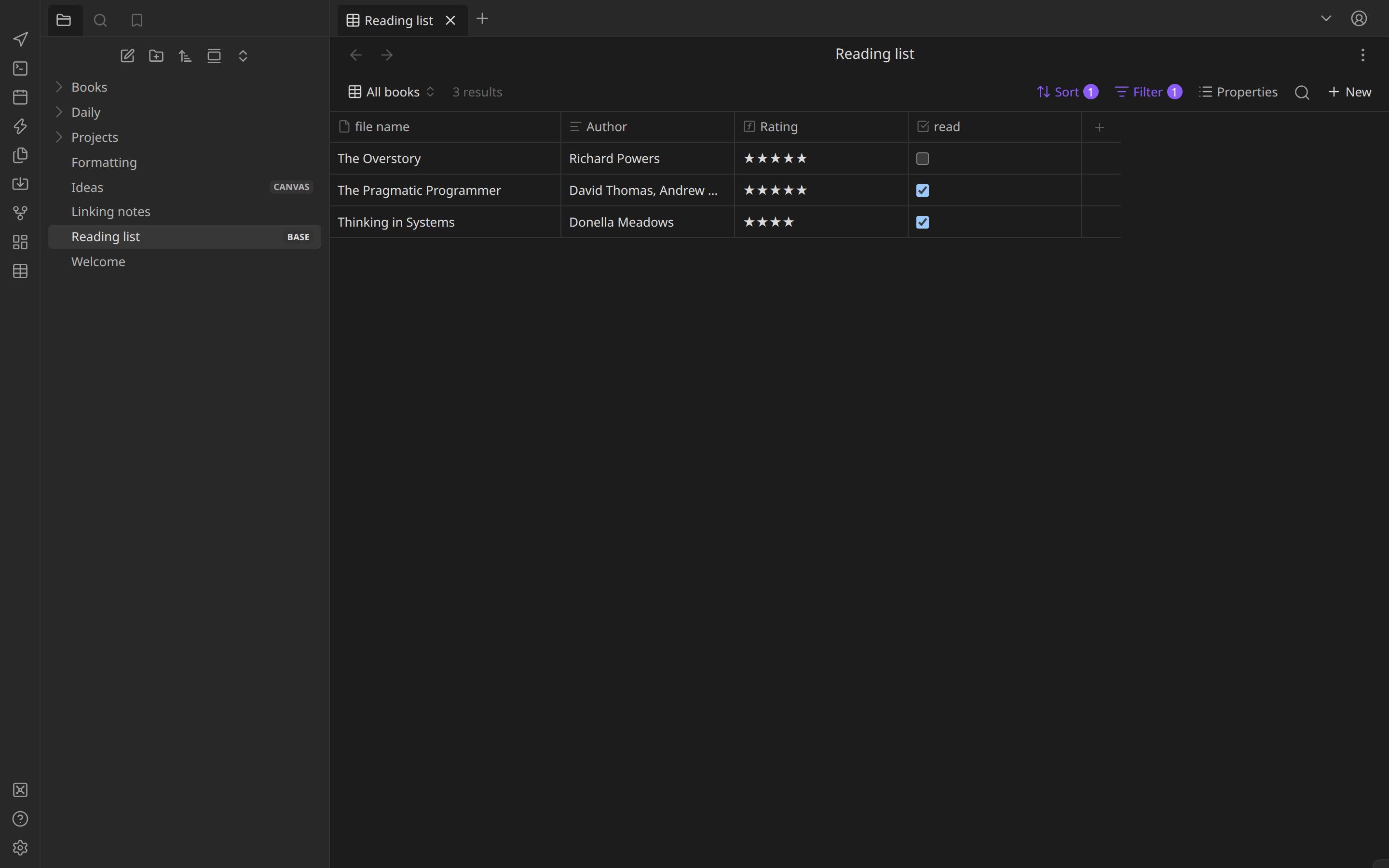
What a base can do
Ask your vault a question, and keep the answer as a view.
A base is a saved query over the properties at the top of your notes. Every view of it is live: change a note and the base changes with it.
Table
Rows of notes and columns of properties. Edit a value in its cell, resize and rename columns, and choose the row height.
Cards
A gallery of notes, with a cover image taken from a property, and a card size and image fit you set.
List
A compact list with bullets or numbers, and properties inline or indented beneath each note.
Map
Notes with coordinates as markers on a world map you can pan and zoom, drawn without any map tile server.
Filters
Match notes by folder, tag, link or any property, combined with and, or and not, for the whole base or for one view.
Formulas
Add columns computed from other properties with the Bases formula language, run by the app's WebAssembly core.
Sort, group and summarise
Sort by several properties, group rows by a value, and add summaries such as sums, averages and ranges to each group and to the whole table.
New notes that fit
Add a note from the base and it starts in the right folder, with the properties the filters ask for.
Embed and copy
Embed a base in a note with ![[Reading list.base]] or a base code block, copy a table to paste into a note or a spreadsheet, or export it as CSV.
A base is a small text file.
Each base is a .base file of YAML in your vault: its filters, formulas, display names and views. Obsidian and OpenMarkdown open the same file, and you can read or edit it in any text editor.
The rows themselves are your notes. Nothing is copied into a separate database, so there is nothing to sync, migrate or lose.
filters:
  and:
    - file.inFolder("Books")
formulas:
  stars: '"★".repeat(rating)'
views:
  - type: table
    name: All books
    order: [file.name, author, formula.stars, read]
    sort:
      - property: rating
        direction: DESC
  - type: cards
    name: Unread
    filters:
      and:
        - read == false
FAQ
Questions about Bases.
- Can I open the bases I made in Obsidian?
- Yes. Open your vault folder and click a .base file. OpenMarkdown reads the same YAML, with the same filters, formulas, properties and views, and shows the notes it matches.
- Where is the data kept?
- In your notes. A base stores no rows of its own: it is a saved query over the properties at the top of your Markdown files. Edit a value in the table and the note's property changes; edit the note and the table follows.
- Do I need to install anything?
- No. Bases is built into OpenMarkdown, which runs in a browser tab. Opening a real folder on disk needs Chrome, Edge, Brave, Arc or Opera; other browsers keep the vault in browser storage.
- Does the map view send my notes anywhere?
- No. The map is drawn in the app from the coordinates in your notes, with no map tile server, so neither your notes nor your locations leave the device.
- Is this made by Obsidian?
- No. OpenMarkdown is an independent, open-source project and is not affiliated with Obsidian or Dynalist Inc. It opens Obsidian vaults and reads the files Obsidian writes.
Get started
Open your vault and see it as a table.
Your bases, notes and canvases, in one browser tab. Free, and nothing to install.